HI ALL,
While I was working on automation somewhere, I came across situation where I need registry value to validate in script. so hunt began guess simply typing reg command in cmd and wow the command return valid.
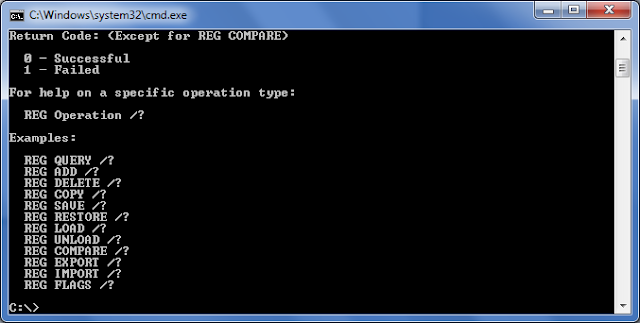
So after looking help I understand that either export will help me or query
Task was to get the firewall setting firewall state of windows, so after googling I got the below path
HKEY_LOCAL_MACHINE\Software\Policies\Microsoft\WindowsFirewall\DomainProfile\
Then running reg query path-to-query got expected out output
C:\>reg query HKEY_LOCAL_MACHINE\Software\Policies\Microsoft\WindowsFirewall\Dom
ainProfile\
HKEY_LOCAL_MACHINE\Software\Policies\Microsoft\WindowsFirewall\DomainProfile
DisplayNotification REG_DWORD 0x1
DefaultInboundAction REG_DWORD 0x1
AllowLocalIPsecPolicyMerge REG_DWORD 0x1
AllowLocalPolicyMerge REG_DWORD 0x1
DefaultOutboundAction REG_DWORD 0x0
EnableFirewall REG_DWORD 0x0


So using reg query you can query any registry key and using reg export you can export the key into specific files
Below is the quick powershell script which checks verify the key value

-Kaustubh
While I was working on automation somewhere, I came across situation where I need registry value to validate in script. so hunt began guess simply typing reg command in cmd and wow the command return valid.

So after looking help I understand that either export will help me or query
Task was to get the firewall setting firewall state of windows, so after googling I got the below path
HKEY_LOCAL_MACHINE\Software\Policies\Microsoft\WindowsFirewall\DomainProfile\
Then running reg query path-to-query got expected out output
C:\>reg query HKEY_LOCAL_MACHINE\Software\Policies\Microsoft\WindowsFirewall\Dom
ainProfile\
HKEY_LOCAL_MACHINE\Software\Policies\Microsoft\WindowsFirewall\DomainProfile
DisplayNotification REG_DWORD 0x1
DefaultInboundAction REG_DWORD 0x1
AllowLocalIPsecPolicyMerge REG_DWORD 0x1
AllowLocalPolicyMerge REG_DWORD 0x1
DefaultOutboundAction REG_DWORD 0x0
EnableFirewall REG_DWORD 0x0

Simply using findstr will give us expected output
C:\>reg query HKEY_LOCAL_MACHINE\Software\Policies\Microsoft\WindowsFirewall\Dom
ainProfile\ | findstr /i "Enable"
EnableFirewall REG_DWORD 0x0

So using reg query you can query any registry key and using reg export you can export the key into specific files
Below is the quick powershell script which checks verify the key value
Script:
Sample Output:

-Kaustubh
While I was working on automation somewhere, I came across a situation where I needed to validate a registry value in a script. So, my hunt began, and I guessed that simply typing the "reg" command in cmd would help. And, wow, the power returned valid results. After seeking help, I understood that either the "export" or "query" command would assist me. My task was to retrieve the firewall state of Windows, and so after Googling, I found the below path. If you require any civil law assignment writing help, feel free to reach out for expert guidance.
ReplyDeleteCool
ReplyDelete2383706C
ReplyDeleteCide
Ortaca
Nusaybin
Salihli
Aksu
Ürgüp
Anamur
Akçay
Dörtyol
7E3FBFFA
ReplyDeleteÜnye
Antakya
Mezitli
Çerkezköy
Beypazarı
Derince
Cebeci
Artuklu
İzmit
4916A928
ReplyDeleteDikili
Menderes
Gazipaşa
Başiskele
Etlik
Pamukova
Selçuklu
Fındıklı
Dalaman